
I Wanted to Build a Live F1 Data Platform. I Couldn't Afford Live Data.
What building an F1 analytics platform taught me about API constraints, Supabase, Vercel, AI-assisted development, and designing around what you actually have.
When I started building F1 Hub, I wanted it to feel like a real F1 analytics product.
Not just a page with a few driver names and a race calendar, but something where a user could explore drivers, teams, circuits, standings, and race information from one place.
Naturally, I wanted live data too.
That idea lasted until I looked at what live F1 data actually costs.
The free option I found, the Ergast API, gave me access to historical Formula 1 data rather than true real-time race information. The live data I wanted—things like changing positions, live timing, sector information, telemetry, and race-session updates—would require a paid data provider.
I was building this as a personal project.
I wasn't going to pay for a real-time data feed just to make a side project look more impressive.
So I changed the problem.
Instead of asking:
How do I build a live F1 platform?
I started asking:
What is the best F1 data product I can build with the data I can realistically access?
That decision ended up shaping the entire project.
The API became a product constraint
It's easy to think about an API as an implementation detail.
You find an endpoint, fetch some JSON, and display it.
That wasn't my experience.
The API determined what the product could actually be.
Ergast was useful because it gave me access to a large amount of Formula 1 information without the cost of a commercial real-time data provider. But it also meant I had to be honest about what the application could and couldn't do.
I couldn't build genuine live race tracking around historical data.
So I focused the application on the parts of Formula 1 information that the data source could support well: championship standings, drivers, constructors, circuits, and the race calendar.
That sounds like a compromise.
It was.
But I think that's an important part of building software.
There is often a difference between the ideal product you imagine and the product you can actually build with your available time, budget, data, and infrastructure.
A good engineering decision isn't always about finding the most powerful technology.
Sometimes it's about accepting a constraint early and designing intelligently around it.
The data looked simple until I tried to build around it
Once I had access to the API, the next problem was understanding how the data should actually move through the application.
Formula 1 information looks neatly organized when you're looking at the finished product.
A driver belongs to a constructor.
A race belongs to a circuit.
A championship has standings.
A calendar has rounds, dates, and locations.
But an API doesn't hand you a finished application model.
You have to figure out what your application actually needs.
My mental model gradually became:
API → application logic → data structure → UI
rather than:
API → screen
That distinction mattered.
The frontend shouldn't need to know every detail about the external API. The application has to interpret the response and turn it into something the interface can work with.
That became more important as I added more parts of the platform.
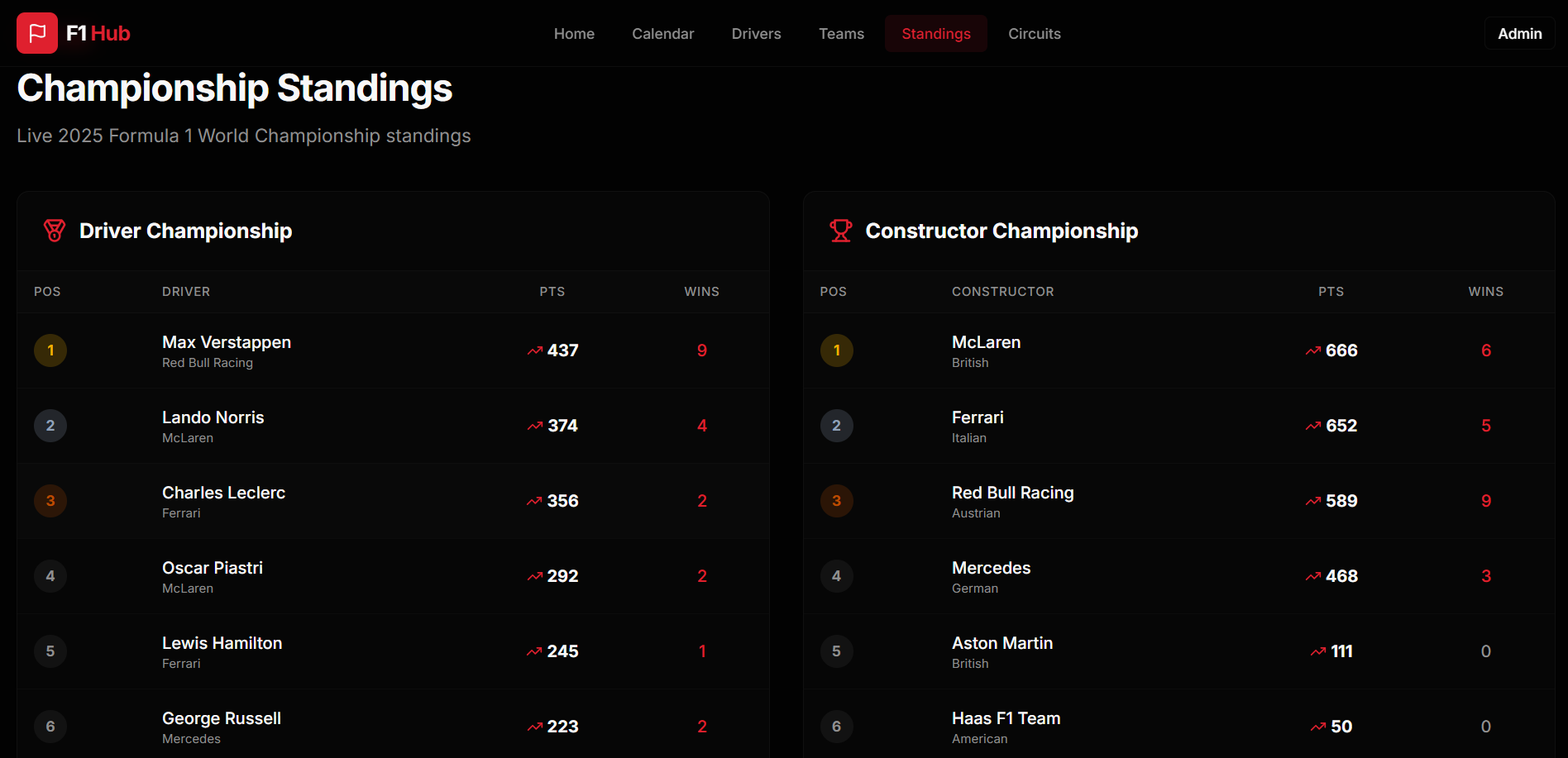
What looks like several independent features to a user is often one data problem underneath.
The standings page, driver information, constructor information, circuit data, and calendar all depend on how the underlying data is understood and organized.
The more I built, the more I started thinking about the data model before thinking about the page.
Then I introduced Supabase
The API wasn't the only new part of the stack.
I also decided to use Supabase.
This was my first time using it, and it became one of the more difficult parts of the project.
Learning a new technology while building a project is different from learning it through a tutorial.
In a tutorial, the architecture is already decided.
You know what the tables look like.
You know where the data goes.
You know how the pieces connect.
I didn't have that luxury.
I had to understand how Supabase fit into the application while I was still figuring out the application itself.
That meant learning a new backend and data layer while also working on the frontend.
And suddenly the project was no longer just a Next.js/React application consuming an API.
I was working across:
Next.js / React
JavaScript / TypeScript
Python
external F1 data
Supabase
Vercel
Each individual technology was manageable.
Getting all of them to work together was the difficult part.
“It works locally” wasn't the finish line
The next challenge appeared when I deployed the application.
I was using Vercel, and getting Supabase integrated with the deployed application was significantly harder for me because I was still learning Supabase in the first place.
This was one of those experiences where local development gives you a false sense of simplicity.
Locally, you can see everything.
You can change something, refresh the page, inspect what happened, and try again.
Once the application is deployed, the environment becomes another part of the problem.
You have application code on one side and external services on the other.
Now you have to think about how the deployed application communicates with the database, how configuration is handled, and why something that appears correct locally might behave differently once it's running on Vercel.
I had to learn that integration through debugging rather than through theory.
That was frustrating at the time.
It was also probably one of the most valuable parts of the project.
I stopped thinking about deployment as the final step after development.
Deployment became part of development.
The hardest bugs weren't necessarily in the code I was looking at
One thing I learned from combining several technologies is that the location of a problem isn't always where the problem appears.
A page can fail to show data even though the frontend component itself is fine.
A database integration can appear broken when the underlying issue is configuration.
An API-related problem can surface as a UI problem because the UI is simply the final place where the missing data becomes visible.
That meant debugging required more than asking:
What's wrong with this component?
I had to think about the whole path:
Where did the data start?
Where did it change?
Where was it stored?
Where was it retrieved?
Where did it stop behaving as expected?
That way of thinking was probably more useful to me than any individual code fix.
It taught me to debug systems rather than just files.
I also used AI to build it
I didn't build F1 Hub completely from scratch, line by line.
I used AI extensively during development.
It helped me explore implementation approaches, work through code, troubleshoot problems, and move faster.
But using AI didn't make the integration problems disappear.
Actually, it made one thing very obvious to me:
Generated code isn't the same thing as working software.
AI can give you a solution that looks convincing.
That doesn't mean the solution is correct for your application.
I still had to integrate the code, run it, test it, inspect the result, and figure out what was actually happening when something failed.
That became my development loop:
ask → understand → implement → test → debug → validate
rather than:
ask → copy → move on
That distinction is important to me because I think AI-assisted development can be misunderstood.
The value isn't that you never have to think about the code again.
The value is that you can spend less time on some parts of implementation and more time reasoning about the system you're building.
But you're still responsible for the result.
The dashboard was the part everyone could see
Eventually, the pieces came together into F1 Hub.
The application brings Formula 1 information together across standings, the race calendar, drivers, teams, and circuits.
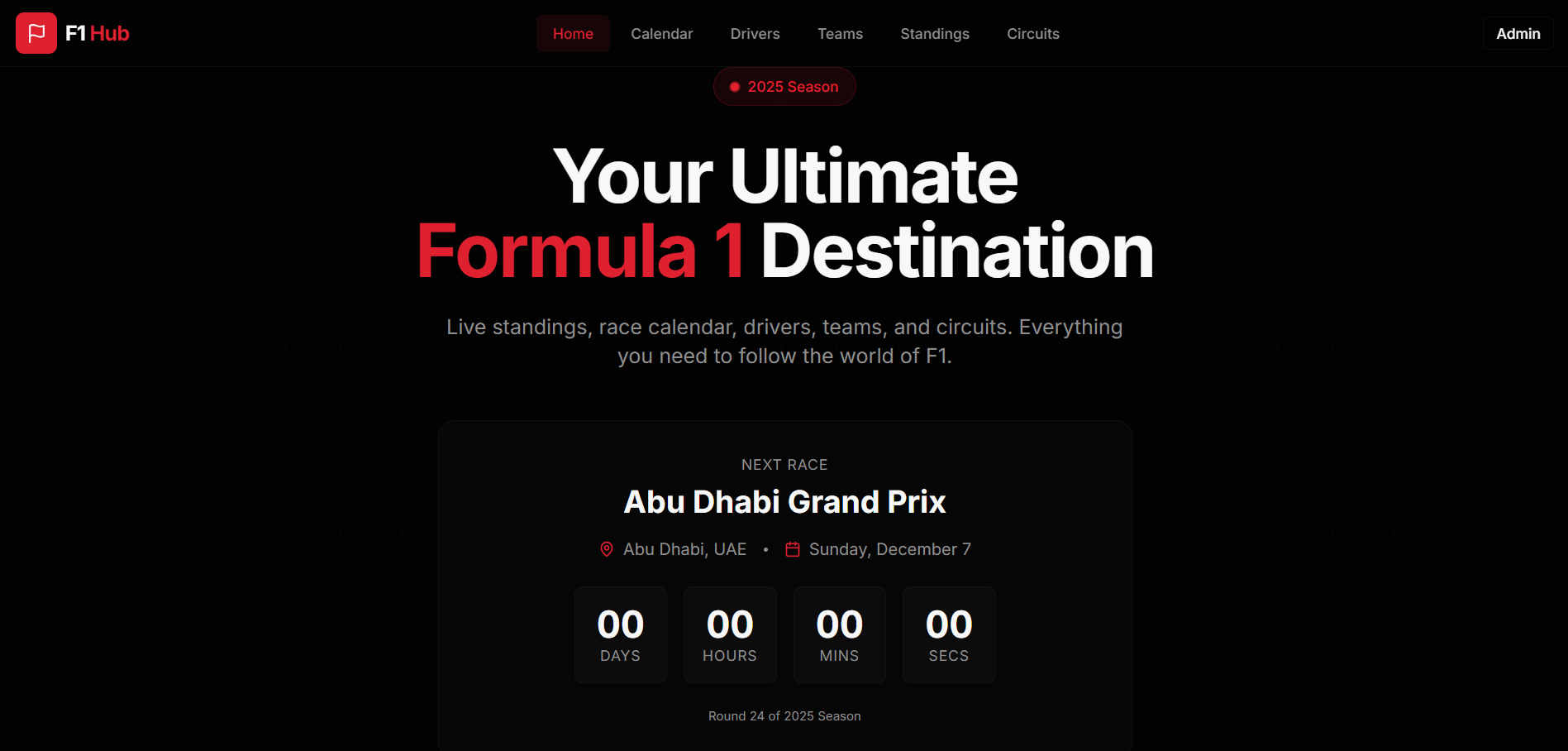
From the outside, it looks like a dashboard.
And that's probably how I would have described the project when I first started it.
But the further I got into building it, the less I thought of it as a dashboard.
The UI was the visible layer.
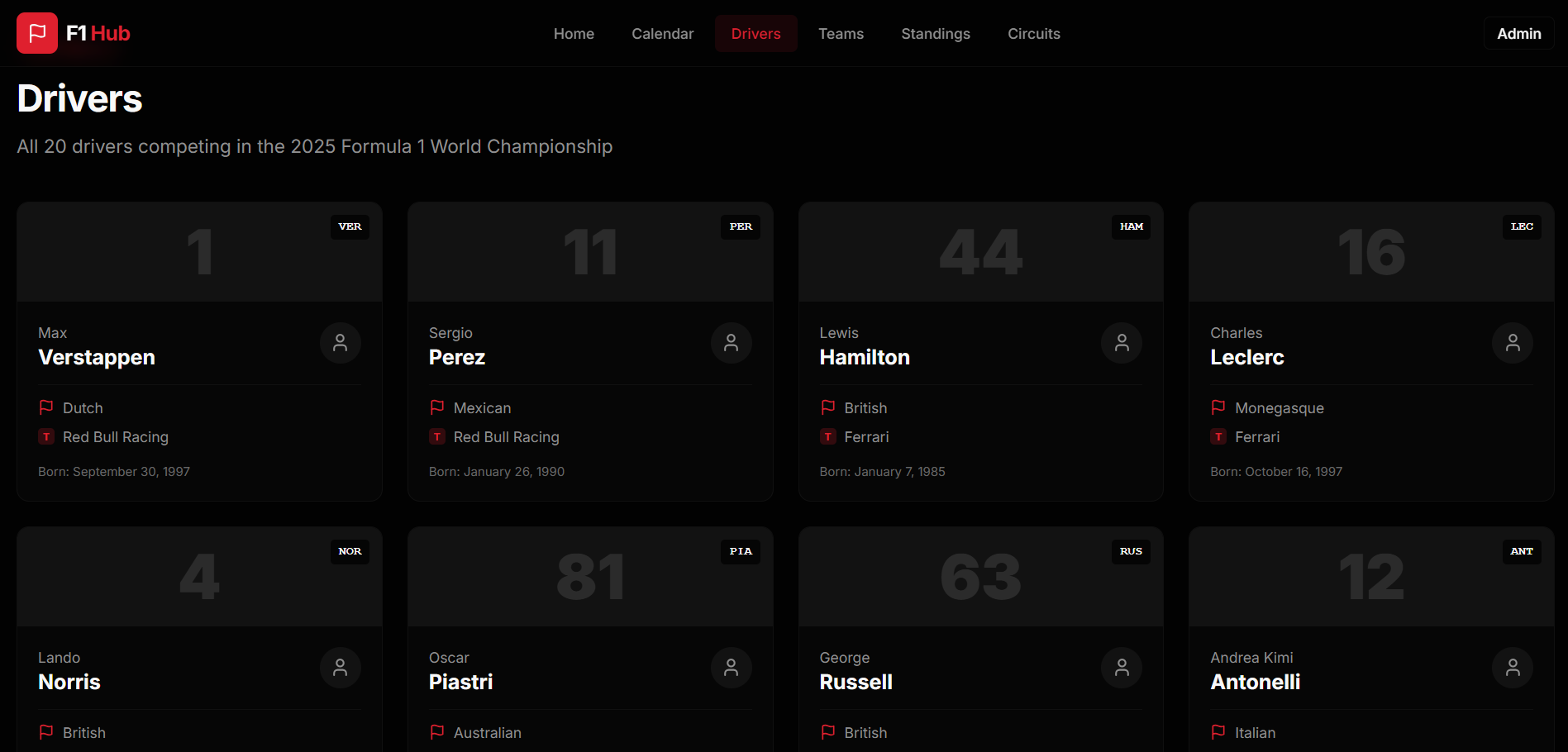
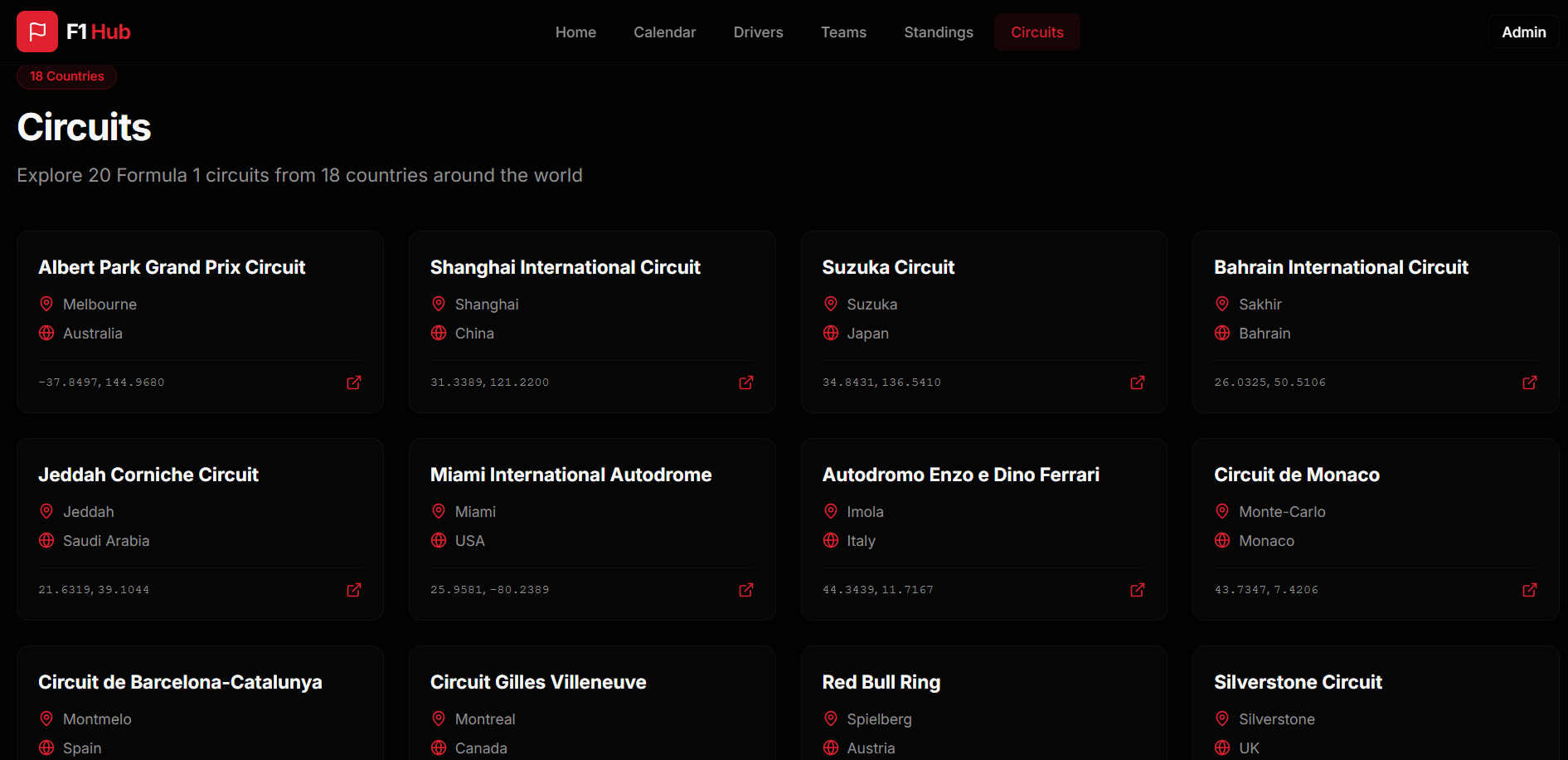
The interesting work was underneath it.
Choosing the data source.
Accepting the limits of that source.
Structuring the data.
Introducing a database.
Learning Supabase.
Getting the pieces to communicate.
Deploying to Vercel.
Debugging problems across different layers.
The interface was the final expression of all of those decisions.
The architecture I ended up thinking about
At a high level, the project became a chain of different systems rather than a single frontend.
         Ergast API
             ↓
       Data Processing
             ↓
         Supabase
             ↓
       Next.js / React
             ↓
          Vercel
             ↓
           User
The exact implementation matters, but the bigger lesson for me was that every layer introduced its own assumptions.
The API had its own limitations.
The database had its own concepts.
The application had to understand both.
And the deployment environment introduced another boundary.
Once I started seeing the project as a system rather than a collection of pages, debugging became much more structured.
When something broke, I could ask which boundary was failing instead of immediately rewriting the component in front of me.
What I would change
There are several things I would approach differently if I rebuilt F1 Hub.
The first would be the data architecture.
Using a free historical API was the right decision for my constraints, but it also placed a ceiling on what the product could offer.
A future version could use a real-time provider if the product justified the cost.
I'd also plan the database layer more deliberately before integrating it. Since Supabase was new to me, some of the learning happened while I was already building the rest of the application.
And I would think about the distinction between local development and production much earlier.
That was one of the biggest lessons from the project.
The architecture isn't finished when the application works on your laptop.
It's finished when the components you depend on work together in the environment where users will actually access them.
What building F1 Hub changed for me
The biggest thing F1 Hub taught me wasn't how to build an F1 website.
It taught me how much software engineering happens outside the part users can see.
I started with a product idea.
Then the available data forced a decision.
The decision affected the feature set.
The feature set affected the architecture.
The architecture introduced a database.
The database introduced a technology I hadn't used before.
The deployment introduced another layer of complexity.
And AI helped accelerate implementation while leaving me responsible for understanding and validating the result.
None of that was in the original mental picture of:
“I'll build an F1 dashboard.”
That's what I find interesting about building software now.
The finished interface can make a project look simple.
The engineering usually isn't.
You start with what you want to build.
Then reality gives you constraints.
The interesting part is what you do next.
F1 Hub
Live application: https://f1-fan-platform.vercel.app/